Daily Dictation vs S English: Which Dictation Website Should You Use?
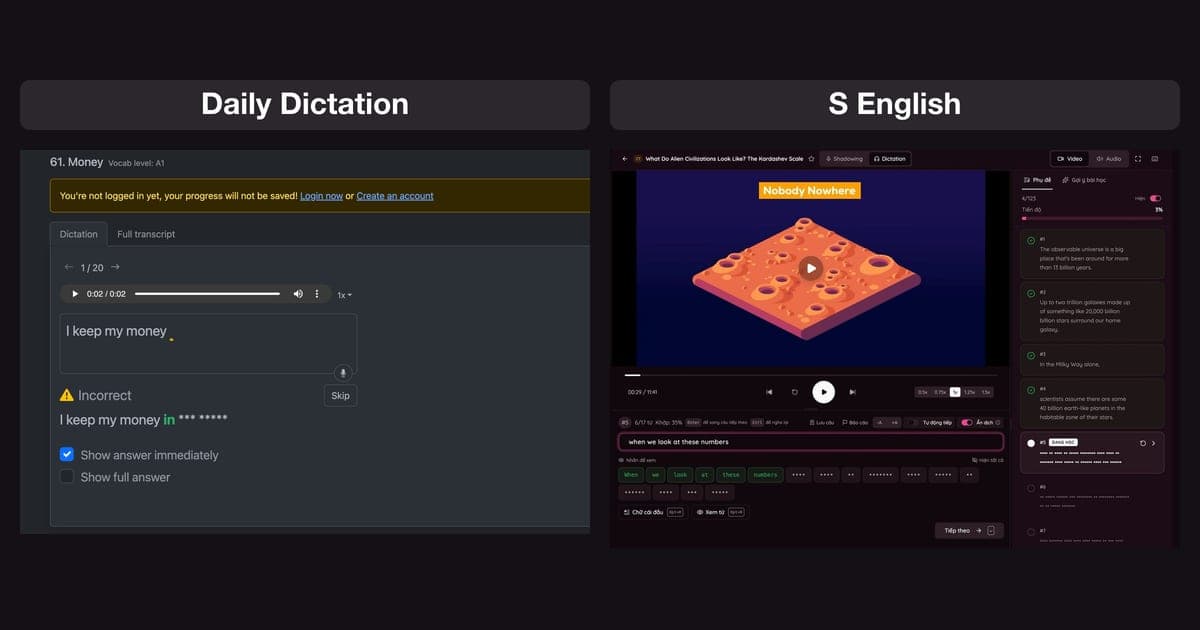
Daily Dictation is one of the most popular English dictation websites, and many learners wonder whether to stick with it or add another tool. This guide explains what Daily Dictation offers and where it shines, then compares it with S English on lesson library, features, pricing and the day-to-day practice experience, so you can choose the right tool for your goal.
What is Daily Dictation?
Daily Dictation (dailydictation.com) is a popular website for practicing English listening through dictation. The method follows four steps that the site itself describes: listen to the audio, type what you hear, check and correct, then read the sentence out loud.
At the time of writing (September 2026), the site lists more than 1,000 exercises and is completely free. Lessons are grouped into 13 categories, each labeled with CEFR levels:
- Short Stories: 289 lessons, A1–C1, a good starting point.
- Exam prep: TOEIC Listening (600 lessons), IELTS Listening (360), TOEFL Listening (54).
- Real-world content: conversations (100), news (218), TED (95), random videos (181).
- Specialist: medical English for the OET (80), IPA (42), plus numbers and spelling names for beginners.
Daily Dictation has apps for iOS and Android. You can practice without logging in, but your progress is not saved. The site also has a leaderboard and extra lessons on expressions and pronunciation.
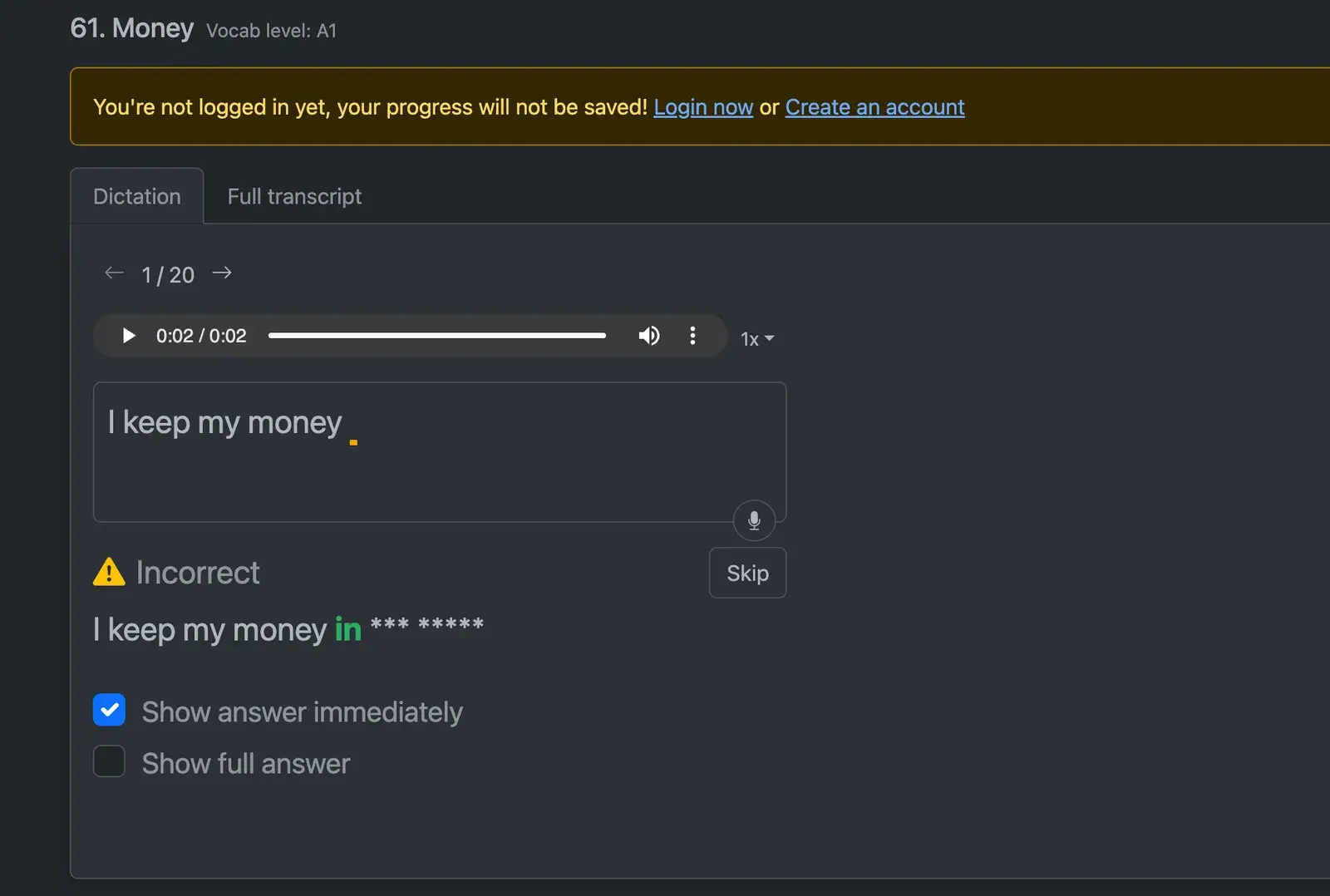
Each lesson is a series of short sentences (for example 1/20). You listen, type and check: if something is wrong, the site shows "Incorrect", reveals what you got right plus the next word, and masks the rest with asterisks. You can change the playback speed, choose to show the answer immediately or in full, skip a hard sentence, and read the full transcript in a separate tab.
Daily Dictation strengths
To be fair, Daily Dictation is popular for good reasons:
- Completely free. There is no paid plan, which suits students who want to train their listening at no cost.
- A very large library. More than 1,000 exercises, including 600 for TOEIC alone. If you need TOEFL or medical English (OET) dictation, it is one of the few places with ready-made lessons.
- Focused on one job. The interface is simple: open a lesson, listen and type. If you only want to train your ear, it is easy to use.
- Android app. Handy if you practice mostly on an Android phone.
Daily Dictation vs S English: key differences
S English (senglish.net) is also a dictation tool, but it takes a different approach. Dictation is one step in a routine that covers listening, speaking and vocabulary on the same lesson. (Disclosure: S English is made by the team writing this article. We compare what each site publishes and list S English's weaknesses too.)
| Feature | Daily Dictation | S English |
|---|---|---|
| Price | 100% free | Free plan for life; Premium from 100k VND a month |
| Dictation lessons | 1,000+ in 13 categories | Hundreds across 12 topics (IELTS, TED, BBC, TOEIC…) |
| Content | Mostly audio, plus TED and video categories | YouTube videos and audio lessons, with a Video/Audio switch |
| Shadowing with word-by-word scoring | Not listed on the site (the typing box has a mic button) | Yes, word by word, with AI feedback |
| Sentence translation (Vietnamese) | Not listed on the site | Yes, can be hidden |
| Saved words and flashcards | Not listed on the site | Yes, with spaced repetition |
| Lessons from any YouTube video | No | Yes (Premium) |
| Platforms | Web, iOS, Android | Web, iOS, Chrome/Edge extension |
| Account required | No (progress not saved) | Yes |
In short: Daily Dictation wins on library size and being fully free. S English focuses on the practice experience and on linking dictation with speaking and vocabulary review.
What dictation feels like on S English
Most of dictation practice is replaying, typing and checking. S English is built to make each of those actions fast and clear.
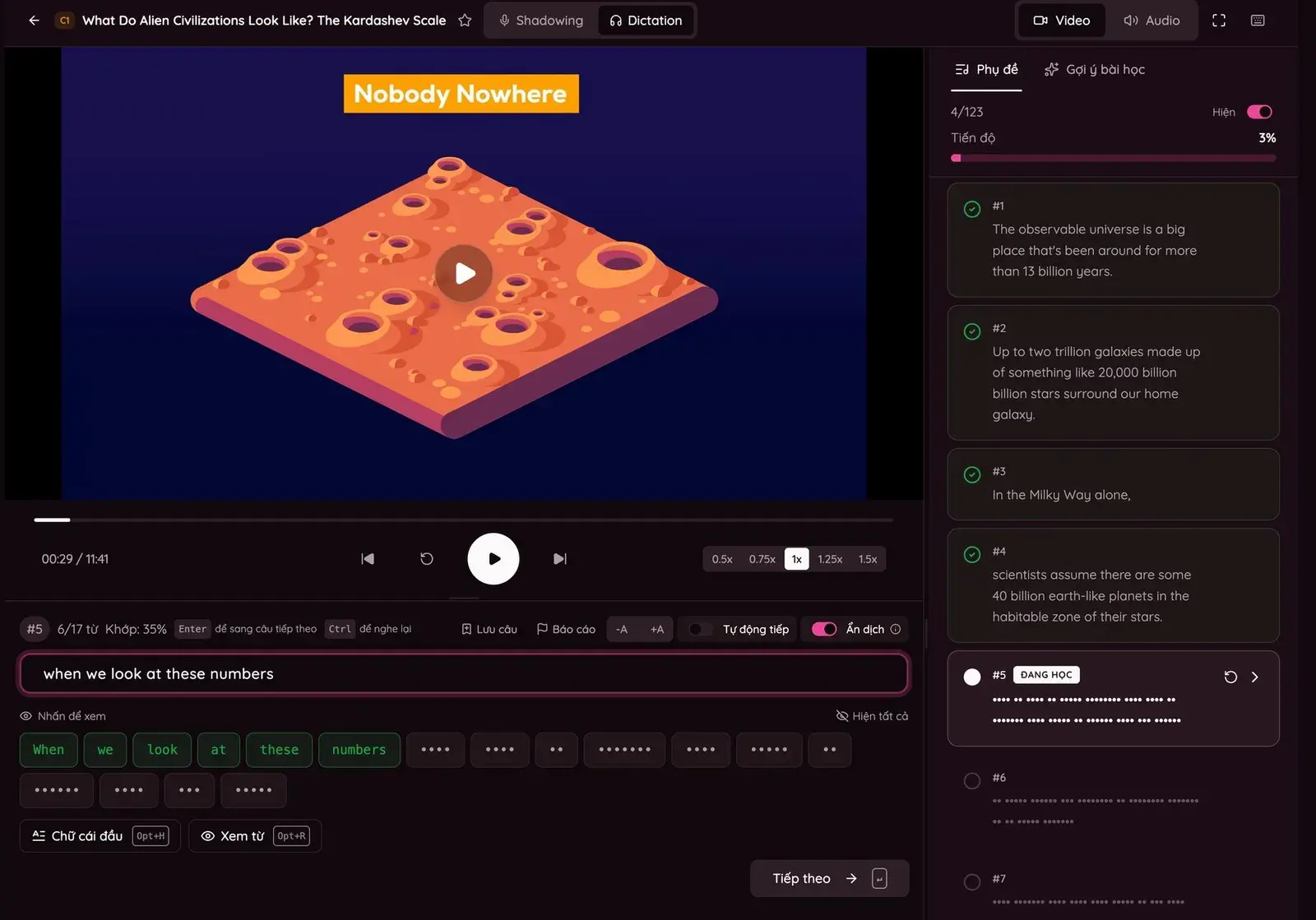
- Word-by-word checking as you type. Every word in the sentence is a tile. Tiles turn green as you get them right, with a word count and a match percentage for the sentence, so you see exactly where you went wrong.
- Graded hints. Stuck on a word? Reveal its first letter (Alt/Option + H) or the whole word (Alt/Option + R). Turn on Hard mode to switch hints off completely.
- Keyboard control. Ctrl replays the sentence, Enter moves to the next one. Playback speed goes from 0.5x to 1.5x, and auto-next lets you work through a lesson without stopping.
- Sentence list and progress. The side panel lists every sentence, which ones you have finished and your overall progress, so you can jump back to a hard sentence in one click.
- Video or Audio mode. Watch the video for context or switch to audio only. You can also enlarge the text and hide the translation to test yourself.
The English dictation practice library is organized by topic and exam, with a CEFR level on every lesson: IELTS (250+ lessons), TED (200+), BBC Learning English (100+), daily conversations (100+), TOEIC (100), plus topics such as Kurzgesagt, business English and job interviews.
More than dictation: shadowing, vocabulary and speaking
Dictation trains your ear to catch every word. But if you only listen, never speak and never review new words, most of what you learn fades within days. This is where S English differs most from a dictation-only site.
- Shadowing on the same lesson. After dictation, switch the lesson to English shadowing with one click. Listen to the model sentence, record yourself and get a word-by-word score, then ask the AI why a word sounded off and how to fix it.
- Save words and sentences. Click any word to see its meaning, or save the whole sentence to your word list.
- Review with flashcards before you forget. Saved words come back on a spaced repetition schedule, so words from today's listening are still there weeks later.
- Speaking and writing when you need them. S English also offers AI speaking practice and writing feedback, so you do not have to jump between sites.
A 20-minute session could be 10 minutes of dictation on a clip, 7 minutes of shadowing the same clip, and 3 minutes reviewing the words you saved. Listening, speaking and vocabulary all come from the same content, which makes them stick.
S English limitations
To be fair, here is where S English falls behind Daily Dictation:
- Fewer lessons. Hundreds rather than 1,000+, and no TOEFL or medical English categories yet.
- Not fully free. The free plan has no time limit, but some lessons, unlimited AI feedback and creating lessons from YouTube videos are Premium features.
- Account required. You need to sign up before practicing.
- No Android app yet. S English runs on the web, iOS and as a browser extension.
Daily Dictation or S English: which should you choose?
There is no single right answer. Choose by your goal:
- Choose Daily Dictation if you only want dictation, need as many free lessons as possible, are preparing for TOEFL or the OET, or study mostly on Android.
- Choose S English if you want to practice listening and speaking on the same lesson, want word-by-word checking and sentence translations, want to save and review vocabulary, or prefer learning from real YouTube videos.
- Or use both. Plenty of learners do dictation on one site and shadowing on another. Practicing every day matters more than how many tools you use.
New to dictation? Read our dictation guide for beginners. For free sources such as BBC, TED and VOA, see the 10 best free English dictation websites. Preparing for an exam? There are guides for TOEIC dictation and IELTS dictation.
FAQ
Is Daily Dictation free?
Yes. At the time of writing (September 2026), Daily Dictation says it is completely free with no paid plan. You can practice without logging in, but you need an account to save progress.
How many lessons does Daily Dictation have?
The site lists more than 1,000 exercises in 13 categories, including short stories, conversations, news, TED, TOEIC (600), IELTS (360), TOEFL and medical English for the OET, each labeled with CEFR levels.
Does Daily Dictation have shadowing?
Daily Dictation encourages you to read each sentence aloud and its typing box has a mic button, but the site does not list a shadowing mode with word-by-word scoring. If you need that, S English lets you switch any dictation lesson to shadowing.
What are websites like Daily Dictation?
S English also splits videos and audio into sentences to listen and type, checks each word as you type, and adds translations, shadowing and saved-word review. Free sources such as BBC Learning English and VOA offer audio and transcripts to check yourself.
Should I use Daily Dictation or S English?
Pick Daily Dictation if you want as many free dictation lessons as possible or need TOEFL and OET material. Pick S English if you want listening, speaking and vocabulary on the same lesson with word-by-word checking. Using both is fine too.
Try dictation for free on S English
Hundreds of IELTS, TOEIC, TED and BBC lessons split into sentences, checked word by word, and one click away from shadowing. Start free.
Practice free